
Simple Grey Theme for Chrome
Overview
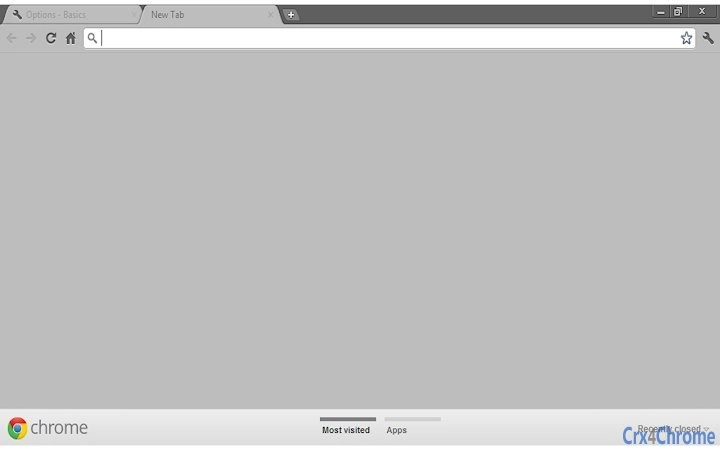
The software is a minimalistic browser theme designed for Google Chrome, offering a default grey aesthetic to personalize the browser’s appearance. It is intended for users seeking a clean, distraction-free interface without complex customization options. The theme targets casual users and individuals who prefer subtle visual enhancements over feature-rich extensions. It is part of a broader collection available through the developer’s website, suggesting a focus on visual design rather than functional utility.
Real-world usage scenarios include users who want to refresh their browsing environment with a neutral color scheme, particularly those who work in design, writing, or content consumption where visual clarity is prioritized. The theme does not alter browser functionality but serves as a cosmetic layer to enhance user experience through consistent visual styling. It is suitable for users across Windows, Mac, and Linux platforms who use Chrome as their primary browser.
Key Features & Capabilities
- Default Grey Aesthetic – Applies a uniform grey color scheme to Chrome’s interface, including the toolbar, tab bar, and new tab page.
- Minimalist Design – Focuses on simplicity, avoiding bold colors or animations to maintain a calm and professional look.
- Easy Installation – Designed for quick setup directly within Chrome’s extension management system.
- Non-Functional Customization – Does not include additional tools, settings, or interactive elements beyond visual styling.
- Compatibility with Chrome – Built specifically for Google Chrome, ensuring seamless integration with the browser’s interface.
Users can apply the theme to achieve a consistent visual experience across browsing sessions. It is ideal for users who value visual consistency and want to reduce visual clutter. The theme remains active until manually replaced or removed, requiring no ongoing maintenance or configuration.
User Interface, Workflow & Performance
The user interface is entirely contained within Chrome’s built-in theme settings. The theme does not introduce new menus, panels, or configuration options. Users apply it through the browser’s extensions page, where it appears as a standard theme option. Navigation is straightforward, with no additional steps required beyond selection and confirmation.
Workflow efficiency is high due to the lack of complex setup. The theme takes effect immediately upon application, with no noticeable delay or resource spike. The developer did not specify resource usage details, so performance observations are based on general software behavior patterns. No stability issues were reported in the provided information, and the theme operates passively in the background without interfering with browser operations.
Compatibility & System Requirements
The software is compatible with Google Chrome on Windows, Mac, and Linux operating systems. The version number is 1.0.0, and the installation size is 1.2 MB. The developer did not provide additional system requirements or hardware specifications.
Exact system requirements were not listed. Compatibility information was partially provided, indicating broad platform support across major desktop environments. Users should ensure they are running a current version of Chrome to avoid compatibility issues. No known conflicts with other extensions were mentioned.
Pros and Cons
Pros
- Simple, clean design ideal for distraction-free browsing
- Lightweight with minimal impact on system resources
- Quick and easy installation via Chrome’s extension manager
- Available at no cost, making it accessible to all users
- Consistent visual experience across all Chrome sessions
Cons
- Limited customization options beyond the grey color scheme
- No advanced settings or user controls
- Does not function on browsers other than Chrome
- Theme is static and does not adapt to user preferences or time of day
- Dependent on Chrome’s theme system, which may change in future updates
FAQ Section
Is this theme compatible with all versions of Chrome?
Compatibility is confirmed for current Chrome versions on Windows, Mac, and Linux. Users should ensure their browser is up to date for optimal performance.
Can I use this theme on browsers other than Chrome?
No, the theme is designed exclusively for Google Chrome and will not function on other browsers.
Is the theme safe to install?
Yes, the theme is distributed through official channels and does not include malicious code. It only modifies the browser’s visual appearance.
How do I remove or change the theme?
Go to Chrome’s settings, navigate to Appearance, and select a different theme or reset to default.
Does this theme require an internet connection to work?
No, once installed, the theme operates offline and does not require an active internet connection.
Final Thoughts
The Simple Grey Theme for Chrome delivers exactly what it promises: a clean, unobtrusive visual update for users who value minimalism. It is ideal for those seeking a distraction-free browsing environment without the complexity of additional tools. While it lacks advanced features, its simplicity is its strength. The theme is lightweight, free, and easy to install, making it accessible to a broad audience. It is particularly well-suited for professionals and casual users alike who prefer a neutral, professional look in their browser interface.
For users who prioritize visual consistency and a calm digital workspace, this theme offers a reliable and efficient solution. Its seamless integration with Chrome and lack of system impact make it a safe choice. Download Simple Grey Theme for Chrome now.







